Skip to main content
Completing Canceled charts (on scene, no transport)
- Confirm Template is GROUND(or FLIGHT)- No Transport / ALS Assist
- Confirm DISPOSITION
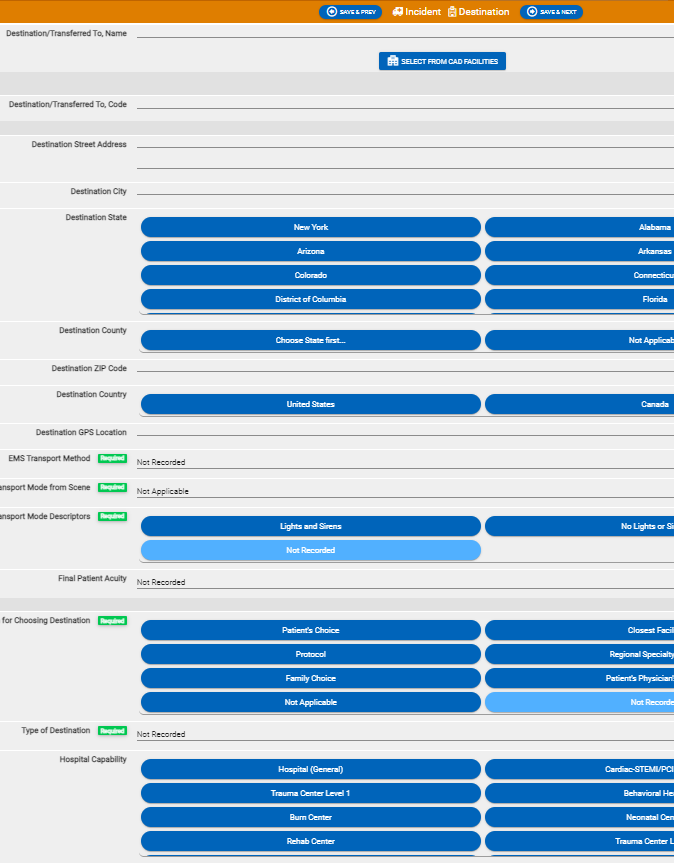
- On DESTINATION TAB
- CLEAR Dest/transferred to name
- CLEAR Dest/trans to code
- CLEAR city, state, county, zip
- EMS transport method = Not Recorded
- Trans mode from scene = Not Applicable
- Addl. Descriptors = Not Recorded
- Reason for choosing Dest = Not Recorded
- Type of Destination = Not Recorded
- On TIMES Tab
- CLEAR unit left scene, & Pt arrived at dest times
- Sometimes CLEAR button works OK, sometimes you have to use red circle/slash & select Clear Selection
- SET Unit Cancelled date/time = Unit back in service time
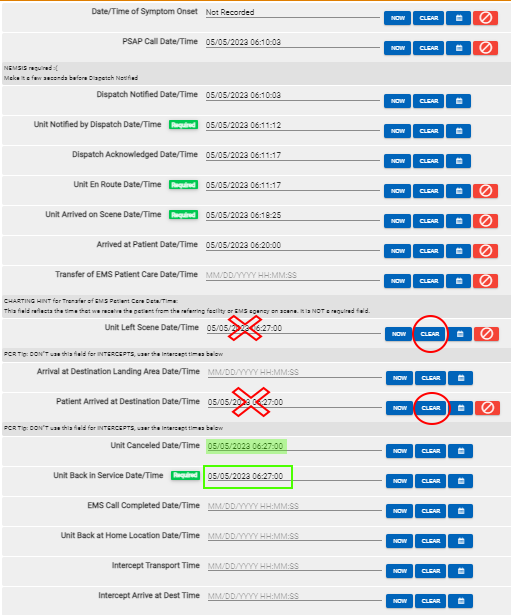
- If the finalize fails, typically with 4 schematron errors, go back and correct times again

Comments
0 comments
Article is closed for comments.